Amplify ELA is the only ELA curriculum that takes the Science of Reading to the next level.
Truly designed for students entering the middle grades, Amplify ELA engages and empowers learners, and addresses the very specific and unique needs of students in grades 6–8.
Rated all-green on EdReports, Amplify ELA earned perfect scores across all gateways.
Scroll down to learn how ELA is uniquely designed to help all your Denver middle schoolers make learning leaps in literacy.
Meet Amplify ELA
Developed specifically for the needs of students entering the middle grades, Amplify ELA is a blended curriculum that promises:
A structured, yet flexible approach.
Carefully crafted, age-appropriate materials and activities that aren’t too “babyish” or too mature.
Complex, content-rich literature and informational texts that ensure ample opportunities for students to encounter both “windows and mirrors”.
Highly engaging lessons that keep adolescents plugged in and motivated to learn.
An instructional design that levels the playing field for every student.
In Amplify ELA, all students read the same text with the help of differentiated supports. In other words, we don’t dumb things down; we bring students up. Our robust collection of diverse texts and research-based approach to instruction not only engage students, but build confidence.
Denver Public Schools (DPS), check out what’s new from Amplify Science 6-8! The first part of this site will take you through the updates that have been made to Amplify Science. The second will be a refresher of Amplify Science for any new users in DPS. With Amplify Science, DPS students don’t just passively learn about science concepts. Instead, they take on the role of scientists and engineers to actively investigate and figure out real-world phenomena. With culturally sustaining pedagogy, Amplify Science strives to make sure every student feels included in the science classroom.
Update: The Digital Experience
The digital experience allows students to engage with digital lessons and provides teachers with everything they need in one place—ready-to-use slides-based lessons, seamlessly integrated teacher prompts and guidance, robust PD resources, and more. It’s now easier and more engaging than ever to plan lessons, present digital content, and review student work. To learn more, click here.
Update: The PD Library
All professional development (PD) content is consolidated into the PD Library, a one-stop hub for all your self-paced PD needs. As a result, the “Professional Learning Resources” tile will no longer be available on the main Amplify Science Program Hub page. The rest of the non-PD content in the Program Hub will remain as is, including the on-demand resources.
Update: Educator & Student Home expansion
Educator and Student Home landing pages will now be available for all Amplify Science users. This Home page provides a central location to access all Amplify programs in one place and a customized stream based on your activity.
Your Amplify Science grades 6–8 students will no longer access My Work for assignments, scores, and teacher feedback. Instead, they’ll find it all on Student Home, the page they already land on when logging in to Amplify Science.
Keep in mind: Amplify Science middle school teachers will continue to have access to Classwork.
Update: Caregiver Hub
Throughout the school year, teachers can share the Amplify Science Caregiver Hub with students’ families. This site provides curriculum details, an overview of what caregivers can expect throughout the school year, and resources they can use with students at home.
What is Amplify Science?
The Lawrence Hall of Science
Developed by the science education experts at UC Berkeley’s Lawrence Hall of Science and the digital learning team at Amplify, our program features:
A phenomena-based approach where students construct a complex understanding of each unit’s anchor phenomenon.
A blend of cohesive storylines, hands-on investigations, rich discussions, literacy-rich activities, and digital tools.
Carefully crafted units, chapters, lessons, and activities designed to deliver true three-dimensional learning.
An instructional design that supports all learners in accessing all standards.
The Amplify Science program is rooted in the proven, research-based pedagogy of Do, Talk, Read, Write, Visualize. Here’s how each element works:
Do
First-hand investigations are an important part of any science classroom, and Amplify Science has students getting hands-on in every unit—from building models of protein molecules to experimenting with electrical systems.
Talk
Student-to-student discourse and full-class discussions are an integral part of the program. Students are provided with numerous opportunities to engage in meaningful oral scientific argumentation, all while fostering a collaborative classroom environment.
Read
Students read scientific articles, focusing their reading activities on searching for evidence related to their investigation and, importantly, on asking and recording questions as they read through fascinating texts on 21st-century topics.
Write
Following real-world practices, students write scientific arguments based on evidence they’ve collected, making clear their reasoning about how a given piece of evidence connects to one of several claims.
Visualize
By manipulating digital simulations and using modeling tools to craft visualizations of their thinking— just as real scientists and engineers do—students take their learning far beyond the confines of what they can physically see in the classroom in an exciting and authentic way.
Program structure
Our cyclical lesson design ensures students receive multiple exposures to concepts through a variety of modalities. As they progress through the lessons within a unit, students build and deepen their understanding, increasing their ability to develop and refine complex explanations of the unit’s phenomenon.
It’s this proven program structure and lesson design that enables Amplify Science to address 100% of the Next Generation Science Standards (NGSS) and support students in mastering the Pennsylvania Science Standards.
Unit types
While every unit delivers three-dimensional learning experiences and engages students in gathering evidence from a rich collection of sources, each unit also serves a unique instructional purpose.
In grades 6–8:
One unit is a launch unit.
Three units are core units.
Two units are engineering internships.
Launch units are the first units taught in each year of Amplify Science. The goal of the Launch unit is to introduce students to norms, routines, and practices that will be built on throughout the year, including argumentation, active reading, and using the program’s technology. For example, rather than taking the time to explain the process of active reading in every unit in a given year, it is explained thoroughly in the Launch unit, thereby preparing students to read actively in all subsequent units.
Core units establish the context of the unit by introducing students to a real-world problem. As students move through lessons in a Core unit, they figure out the unit’s anchoring phenomenon, gain an understanding of the unit’s disciplinary core ideas and science and engineering practices, and make linkages across topics through the crosscutting concepts. Each Core unit culminates with a Science Seminar and final writing activity.
Engineering Internship units invite students to design solutions for real-world problems as interns for a fictional company called Futura. Students figure out how to help those in need, from tsunami victims in Sri Lanka to premature babies, through the application of engineering practices. In the process, they apply and deepen their learning from Core units.
DPS Scope and Sequence
Our lessons follow a structure that is grounded in regular routines while still being flexible enough to allow for a variety of learning experiences.
In fact, our multi-modal instruction offers more opportunities for students to construct meaning, and practice and apply concepts than any other program. What’s more, our modular design means our units can be flexibly arranged to support your instructional goals.
Program components
Available digitally and in print, our unit-specific reference guides are chock-full of helpful resources, including scientific background knowledge, planning information and resources, color-coded 3D Statements, detailed lesson plans, tips for delivering instruction, and differentiation strategies.
Hands-on learning is an essential part of Amplify Science, and is integrated into every unit. Students actively participate in science, playing the roles of scientists and engineers as they gather evidence, think critically, solve problems, and develop and defend claims about the world around them. Every unit includes hands-on investigations that are critical to achieving the unit’s learning goals.
More hands-on with Flextensions: Hands-on Flextensions are additional, optional investigations that are included at logical points in the learning progression and give students an opportunity to dig deeper if time permits. These activities offer teachers flexibility to choose to dedicate more time to hands-on learning. Materials referenced in Hands-on Flextension activities will either be included in the unit kit or are easily sourced. Supporting resources such as student worksheets will be included as downloadable PDF files.
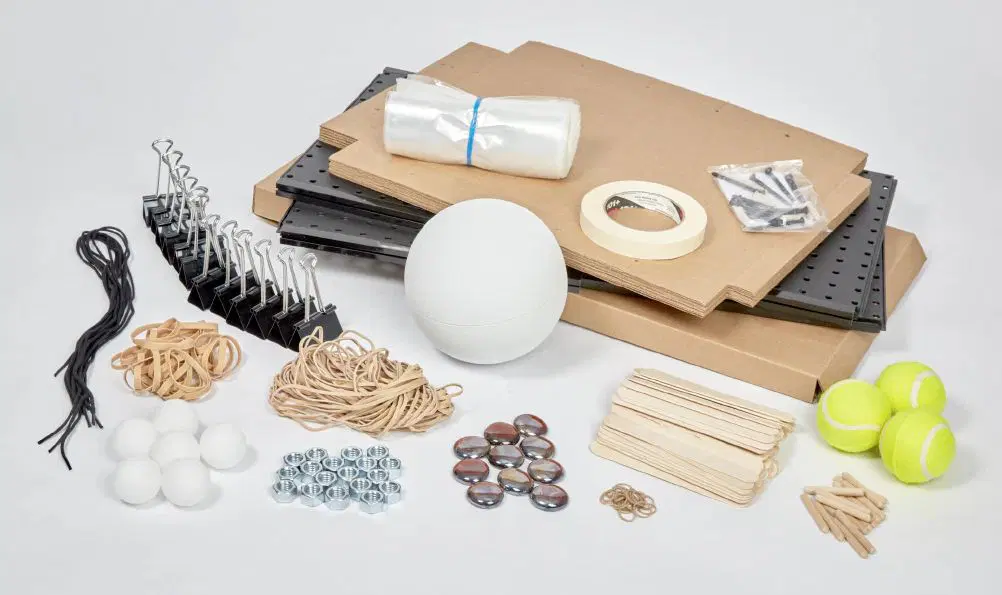
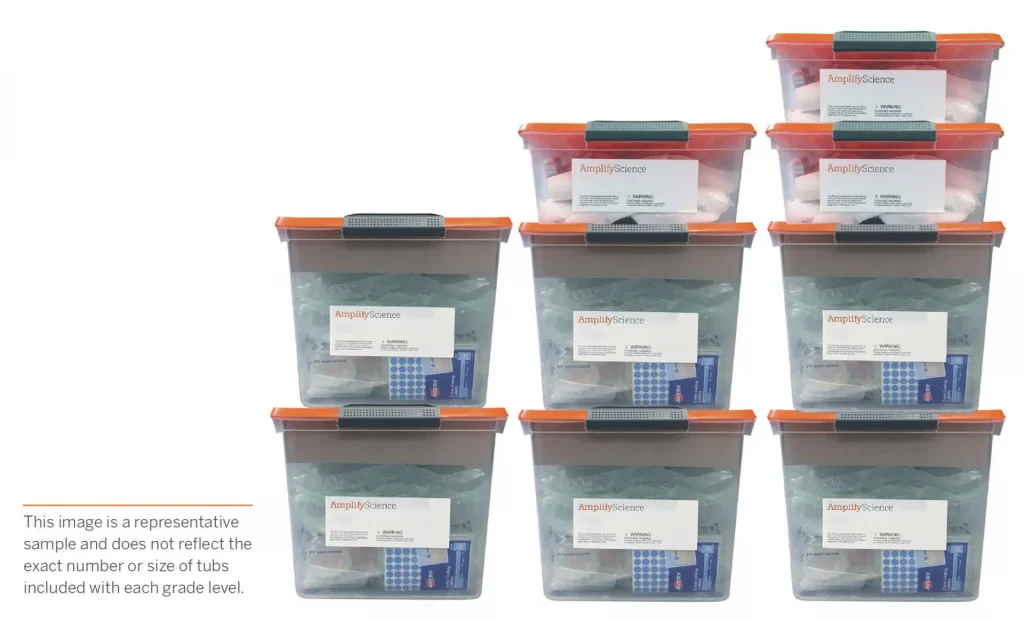
Our kits include enough materials to support 200 student uses. In other words, teachers can easily support all five periods and small groups of 4-5 students each. Plus, our unit-specific kits mean teachers just grab the tub they need and then put it all back with ease.
Our digital Simulations and Practice Tools are powerful resources for exploration, data collection, and student collaboration. They allow students the ability to explore scientific concepts that might otherwise be invisible or impossible to see with the naked eye.
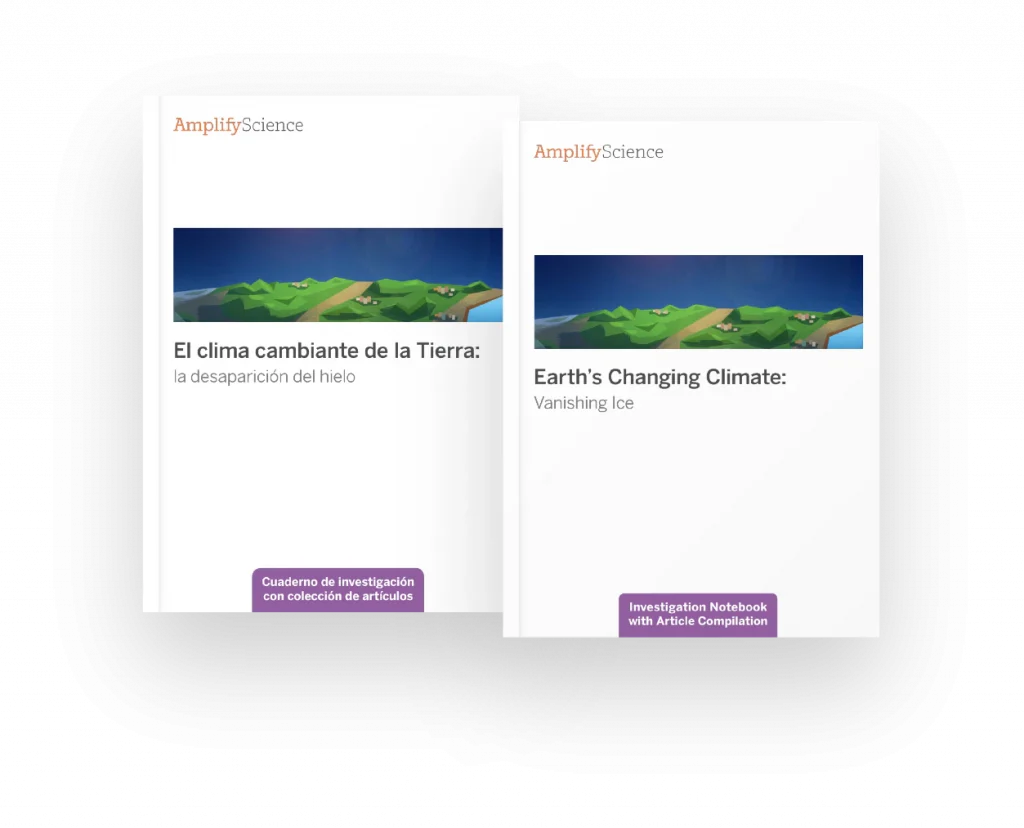
Available for every unit, our Student Investigation Notebooks contain instructions for activities and space for students to record data and observations, reflect on ideas from texts and investigations, and construct explanations and arguments.
In grades 6–8, one copy of the Student Investigation Notebook is included in each unit’s materials kit for use as a blackline master. Each notebook is also available as a downloadable PDF on the Unit Guide page of the digital Teacher’s Guide.
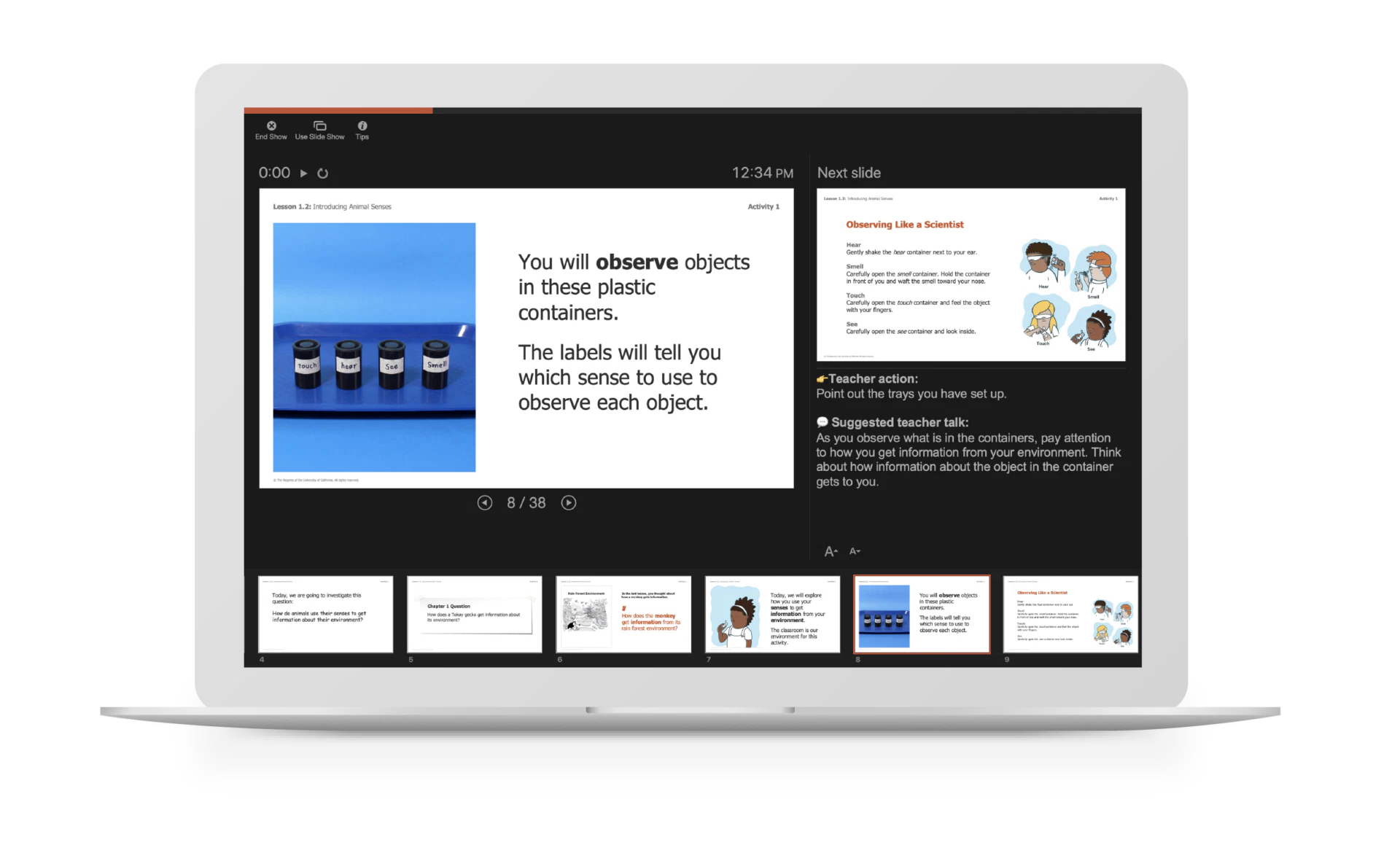
These customizable PowerPoints are available for every lesson of the program and make delivering instruction a snap with visual prompts, colorful activity instructions, investigation set-up videos and animations, and suggested teacher talk in the notes section of each slide.
Explore your print samples
With your Amplify Science print samples, you’ll find unit-specific Teacher’s References Guides, Student Investigation Notebooks, and sets of Student Books for each grade level.
A note about the Teacher Reference Guides:
It’s important that you see the full breadth and depth of our instruction. For that reason, we provide a copy of each of our unit-specific Teacher Reference Guides.
Rest assured that teachers do not use these robust reference guides for day-to-day teaching. For that, we have a hands-free Teacher’s Guide!
Teacher Reference Guide: Unlike a typical TG that requires a series of supplemental books to support it, our encyclopedic reference guide is chock-full of everything a teacher needs to fully implement our program and the NGSS.
Ready-to-Teach Lesson Slides: For daily instruction, teachers need their hands free. That’s why we created ready-to-teach lesson slides for every single lesson. What’s more, they are editable and include suggested teacher talk and point-of-use differentiation and other instructional tips. Click to learn more.
A note about the Materials Kits:
Hands-on learning is at the heart of Amplify Science, and is integrated into every unit. In order to make hands-on learning more manageable for busy teachers, Amplify Science materials are organized into unit-specific kits.
Our unit-specific kits:
Include more materials — We give teachers enough materials to support 200 student uses.
Are more manageable — Unlike other programs that require large groups of students to share limited sets of materials, our kits include enough to support small groups of 4–5 students.
Include supportive videos — Each hands-on activity provides clear instructions for the teacher, with more complex activities supported by video demonstrations and illustrations.
At your request, we did not include our materials kits with our submissions samples. However, we did provide grade-specific lists of all materials included in each kit, which you can also find with the links below.
To help familiarize yourself with navigating the digital platform, watch the below navigational video.
Spanish-language support
Amplify Science is committed to providing support to meet the needs of all learners, including multiple access points for Spanish-speaking students. Developed in conjunction with Spanish-language experts and classroom teachers, several components are available in Spanish across the Amplify Science curriculum.
Spanish-language materials include:
COMPONENT
TEACHER/STUDENT
Student Investigation Notebooks
Student
Science articles
Student
Video Transcripts
Student
Digital simulation translation keys
Student
Printed classroom materials Unit and chapter questions, key concepts, vocabulary cards, etc.
Teacher
Copymasters
Teacher
Assessments
Teacher
Digital student experience license This license gives students access to the student resources in Spanish, including instructional text, articles, and assessments. Teachers can control student access to Spanish-language content through the digital Teacher’s Guide.
Teacher
Spanish teacher support license This license includes teacher talk, projections, downloadable PDFs of all print resources, and video transcripts and closed captioning in Spanish.
If you have any further questions as your review Amplify Science, please contact:
Monty Lammers
Senior Account Executive
719-964-4501
mlammers@amplify.com
DPS teachers, welcome to Amplify Science!
Here you’ll learn more about the program, download a pre-launch checklist, and read about how to get help when planning and delivering instruction.
Program introduction
Onboarding: What to expect
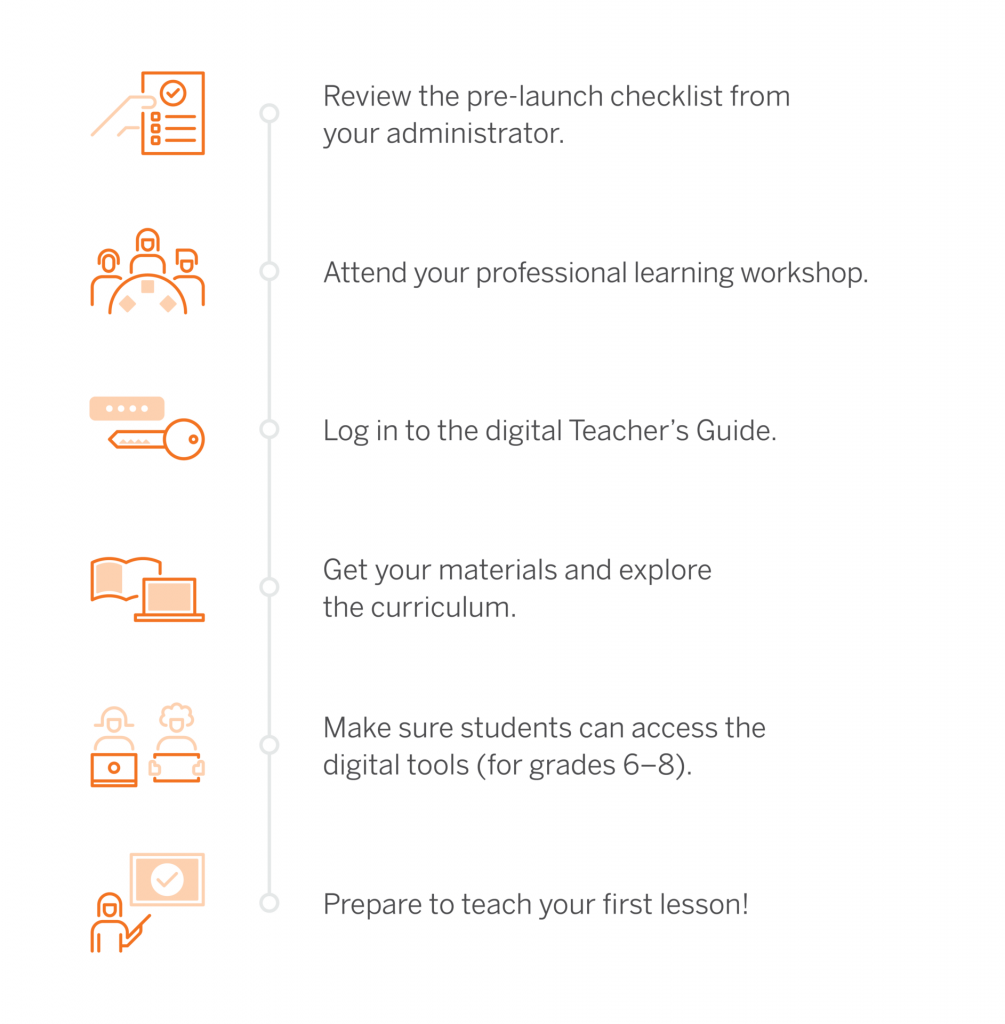
Welcome to Amplify Science! To help you know what’s coming next, we created the following visual that outlines the steps of the onboarding process. You can use it as a reference.
Onboarding videos
To start using Amplify Science quickly in your classroom, check out the following onboarding videos. They cover what you need to know to get started fast, from unpacking materials to logging in and navigating the digital Teacher’s Guide.
What’s online?
Program pacing
Planning strategies
How to log in and navigate
Introduction to Classwork (grades 6–8)
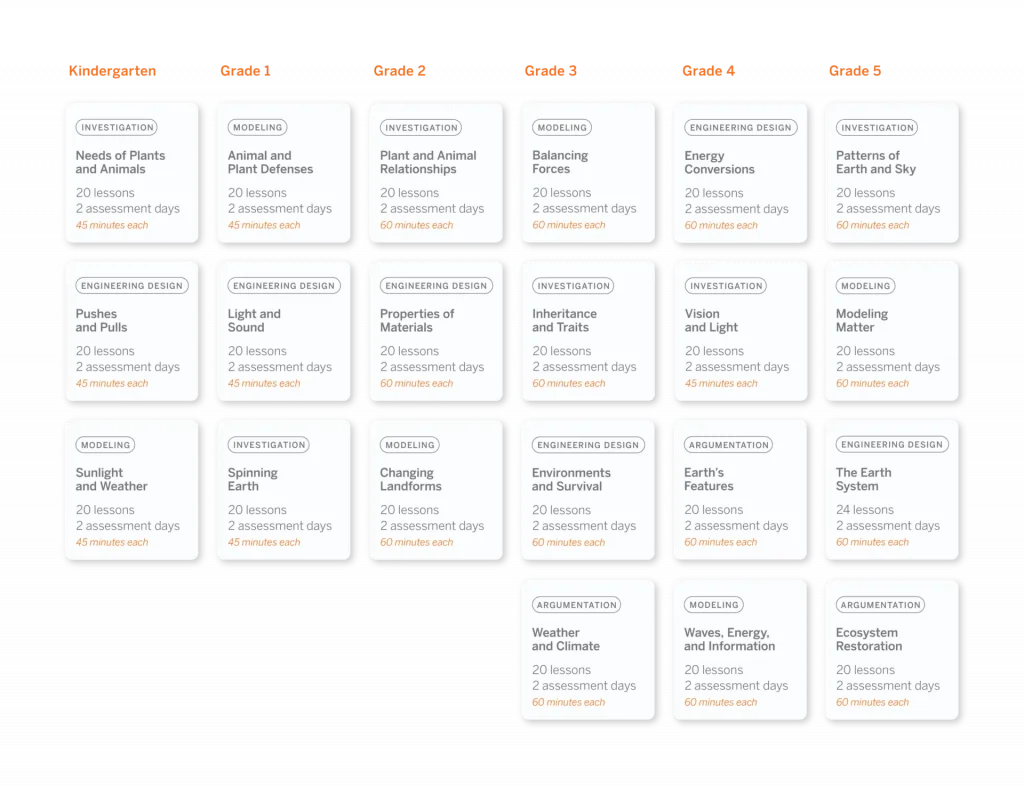
DPS scope and sequence (K–5)
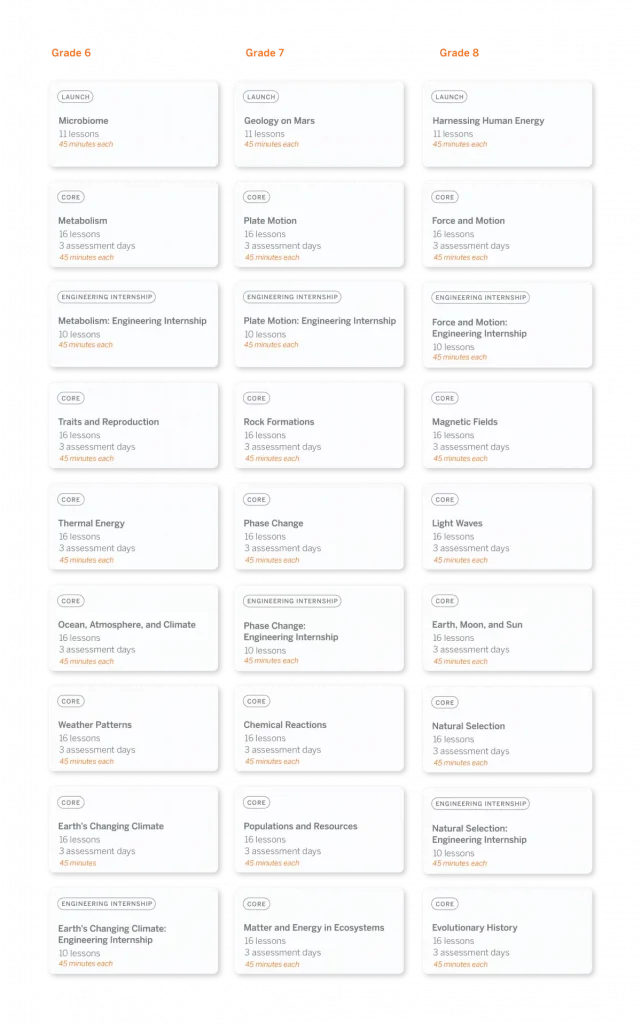
DPS scope and sequence (6–8)
Amplify Science Program Guide
Getting started
The Amplify Science Program Guide details information about the program, including its authorship, development, themes, and more. It serves as a resource for finding out more about the program’s structure, components, supports, how it meets standards, and flexibility.
Navigate through the links below to access more information about the program and to explore resources that can help with your implementation:
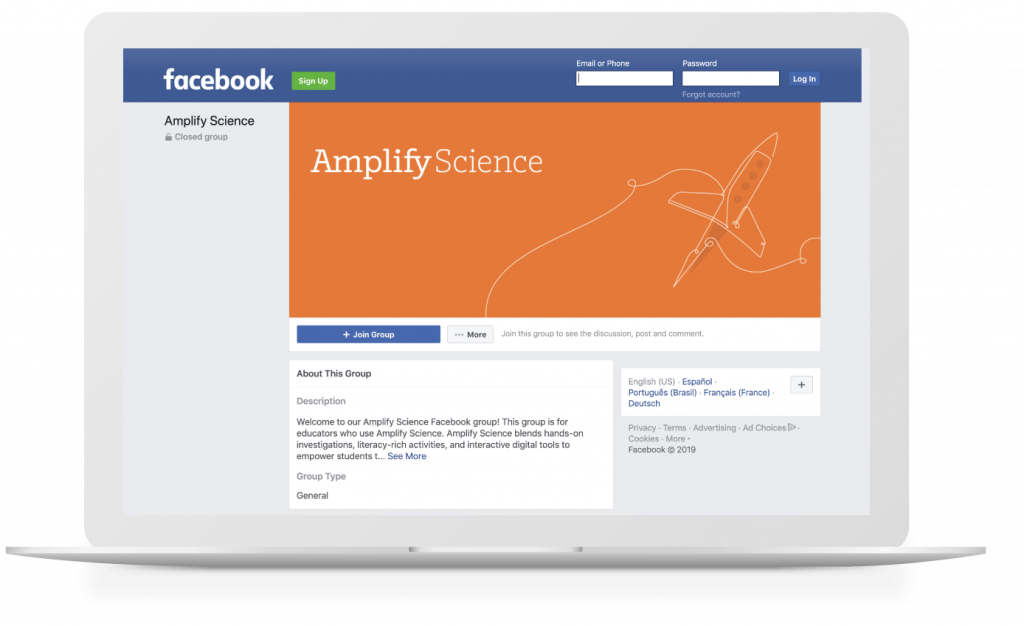
Our Amplify Science Facebook group is a community of Amplify Science educators from across the country. It’s a space to share best practices, ideas, and support on everything from implementation to instruction. Join today.
Looking for help?
Powerful (and free!) pedagogical support
Amplify provides a unique kind of support you won’t find from other publishers. We have developed an educational support team of former teachers and administrators who provide pedagogical support for every Amplify curriculum, assessment, and intervention program. This service is completely free for all educators who are using our programs and includes:
Guidance for developing lesson plans and intervention plans
Information on where to locate standards and other planning materials
Recommendations and tips for day-to-day teaching with Amplify programs
Support with administering and interpreting assessment data and more
To reach our pedagogical team, use our live chat within your program, call (800) 823-1969, or email edsupport@amplify.com
Timely technical and program support
Our technical and program support is included and available from 7 a.m. to 7 p.m. ET, Monday through Friday, through a variety of channels, including a live chat program that enables teachers to get immediate help in the middle of the school day.
Here you’ll find information about enrollment and licensing, materials and shipping logistics, professional learning resources, and more.
Program introduction
Onboarding: What to expect
Welcome to Amplify Science! To help you know what’s coming next, we created the following visual that outlines the steps of the onboarding process. You can use it as a reference.
Technology requirements and guidelines
To ensure that your hardware and network meet the minimum technical requirements for optimal performance and support of your digital curriculum products, please see Amplify’s customer requirements page.
To ensure access to Amplify Science, add the URLs on this page to the corresponding district or school-level filters.
DPS scope and sequence (K–5)
DPS scope and sequence (6–8)
Amplify Science Program Guide
Getting started
The Amplify Science Program Guide details information about the program, including its authorship, development, themes, and more. It serves as a resource for finding out more about the program’s structure, components, supports, how it meets standards, and flexibility.
Navigate through the links below to access more information about the program and to explore resources that can help with your implementation:
Our Amplify Science Facebook group is a community of Amplify Science educators from across the country. It’s a space to share best practices, ideas, and support on everything from implementation to instruction. Join today.
Looking for help?
Powerful (and free!) pedagogical support
Amplify provides a unique kind of support you won’t find from other publishers. We have developed an educational support team of former teachers and administrators who provide pedagogical support for every Amplify curriculum, assessment, and intervention program. This service is completely free for all educators who are using our programs and includes:
Guidance for developing lesson plans and intervention plans
Information on where to locate standards and other planning materials
Recommendations and tips for day-to-day teaching with Amplify programs
Support with administering and interpreting assessment data and more
To reach our pedagogical team, use our live chat within your program, call (800) 823-1969, or email edsupport@amplify.com
Timely technical and program support
Our technical and program support is included and available from 7 a.m. to 7 p.m. ET, Monday through Friday, through a variety of channels, including a live chat program that enables teachers to get immediate help in the middle of the school day.
The world has turned upside down in the last few weeks, and we know it can be stressful to figure out how to adjust to this new reality, both personally and professionally. We at Amplify continue to be dedicated to supporting you as you transition to this unprecedented time of remote teaching and learning.
Join us! Click here for Remote Learning Office Hours to collaborate with others on remote learning resources, tools and solutions.
To help you prepare for (and implement) remote learning: